Palettes
General
Palettes are a new feature in petz, made possible by Prism's Modified Fork of Petza. This document will detail briefly what palettes are and how to use them, and then how to use them to create a-registerable, realistic petz for UKC.
Jump to palette
So, what are palettes?
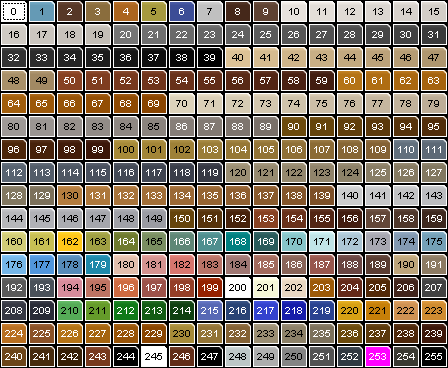
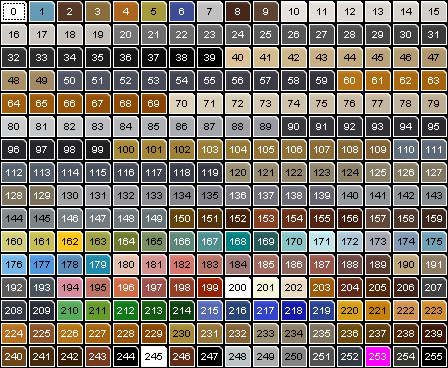
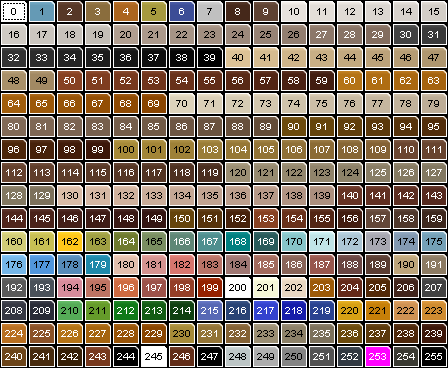
As you may already know, petz uses it's own palette, comprised of 256 different colours. Only the colours from 10-149 are 'texturable', with the rest appearing in game as solid flat colours. These texturable colours are organised into ramps of 10, moving (generally) from the lightest to the darkest shade of a colour over the space of a ramp. The default petz palette, with the index for each colour, is shown below.
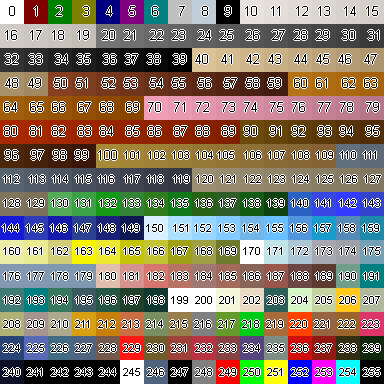
As you can see, we're limited to 256 colours - and in the vanilla petz game, a lot of the colours, particularly for the higher index values, do not even show up as they look on this palette! This is because petz, for whatever reason, remaps some of the index values to others. For example, if you want to use the nice muted purple colour of index 234, in-game it just shows up as jet black, due to this bizarre remapping system. Thankfully, this is an issue that Prism fixed with her Petza fork - with Prism's Petza installed, and the 'Unlock palette' setting checked in Petza settings, all the colours on the petz palette, and external palettes, will show up in game as they do in the palette itself.
Furthermore, with Prism's Petza, external palettes can now be made and used in game, which opens up a huge world of colours for textures. Using a program such as LibreSprite, the indexed .bmp image of the petz palette can be opened, and the indexes of the bitmap can be modified.
How To Enable Palettes
After installing Prism's Petza, these external palettes can then be used in game by following these steps:
1 - Create a folder in the Resource folder of the petz game directory named 'palettes'
2 - Save the external palette .bmp file that you want to use in this folder
3 - In LNZPro, add a [Palette] section to the adult section of the breed or pet LNZ. It can be anywhere in the adult LNZ - I usually just add mine right at the top. Add the name of the palette you want to use on the next row, under the [Palette] section header. For example, if I want to use the 'ukccatz' palette, I should add a section to the LNZ that looks like this:
[Palette]
ukccatz
Do not include the .bmp file extension suffix in the LNZ
4 - In the Petza settings, make sure that the 'Enable Palette Swaps' setting is checked
And now, your existing pet that you edited, or the petz that come out of the Adoption Center of the breed that you edited, should display in their fancy new palette! There are still some limitations with palettes to consider - one pet cannot have multiple palettes, an external palette can still only have 256 different colours, and petz will revert to the default palette colours in photos where they are partially or fully off the screen - but palettes enable so many new things to be achieved in petz hexing.
The following are some useful resources for getting started with palettes:
Prism's Petza - the download and information for Prism's new Petza fork (it adds many other fantastic features beyond palettes!)
Prism's Palette Swap Guide - a more detailed breakdown into getting palettes to work, and how they work
Queenie's Palettesite - a database of the currently available, publically-released palettes made by members of the petz community, maintained by Queenie @ Phantasmagoria. Also includes some useful information at the top about palettes and a list of important index numbers that petz uses by default for certain detail features (e.g outlines, eye whites, 'draw as a nose' outline style)
Mazzew's Video Tutorial for Palette-Making - shows you how to edit the palettes of indexed .bmps in LibreSprite, for making your own palettes! Made by Mazzew @ MazzLabs
Palettes & UKC
Being able to use more and different colours for hexing petz is no doubt, a game changer when it comes to depicting realistic coat colours and patterns in petz. UKC allows P-registration of petz using any palettes, in whatever fancy colours you like. UKC has also decided to allow palettes to be used for A-reg petz, with certain stipulations. This sections details those restrictions and provides info on how to read and interpret the breed standards and standard definitions whilst hexing with palettes.
Guidelines for hexing A-reg petz with palettes
Our intention isn't for restriction at UKC; we want to allow people freedom in hexing A-reg petz with palettes, but we also must strive for these petz to be realistic. You can use whatever palette you like to create pet hexes, however if UKC stewards find that the colours and textures used are not accurate to what a real-life animal could look like, then they will decline the A-reg registration. The last thing anyone wants is for someone to spend time hexing a pet, only to find that the palette they used does not have a suitable eyecolour for the pet's pigment, or that the shade of white in the palette is too yellow to be considered realistic. Therefore, we have suggested the following guidelines:- Indexes 201, 245 and 244 must be unchanged from the default petz palette; these colours are used for default catz eye whites, default dogz eye whites, and default outlines and pupil colours respectively. Indexes 10-19 must also be unchanged, or moved elsewhere in the palette, when hexing a pet that has white fur to any degree - the default petz white range are the only UKC A-reg accepted colours for white fur, as even subtle changes can make white look like a light grey or light ivory. Index 247 has also been found to be used in multiple textures (for example, black tabby textures), so we recommend that this index also remains unchanged from it's usual black to avoid textures appearing 'speckly'.
- As well as not altering the 10-19 (white) ramp, we highly recommend not using a palette that alters the 30-39 (black) ramp. The default petz white and black in these ranges actually do a good job of depicting what those colours look like on real animals. Even very subtle hue shifts in very light (white) colours and very dark colours (black) can make them look drastically different to the human eye - it is just the nature of those colours. For example, a warm tone shift in white can make it look ivory, and a warm shift in black can make it look seal. Similarly, a cold tone shift in white can make it look light silver, and a cold tone shift in black can make it look dark blue. In all cases, the result is not the neutral white and black that is desired.
- We highly recommend giving any palette that you intend to use a once-over before starting to hex your pet. Check for the basics - is there a suitable eye colour for the pet you want to hex, is there a suitable nose colour, are the aforementoned important colours (201, 245 and 244) unchanged?
- Take extra care when using textures with external palettes - the section below goes into textures and palettes in more detail. Transparent and semi-transparent textures will likely show up as intended with external palettes if used correctly, however textures representing external colours (for example, Silver textures, Lilac textures, Cinnamon textures, Ivory textures etc.) will likely not as the indexes that they draw from will likely have had their colour changed. It's recommended to always test the textures you want to use in a palette before committing to a hex.
- Some palettes will mean that the petz' paws and tongue colour will change. These aren't visible in pose, but it is recommended that you change these to an acceptable colour, especially if you intend to show the pet in show types other than Conformation
- When registering a pet, we recommend describing what colour and pattern you were aiming for whilst hexing in the petz' registration notes or in the petz' bio on UKC, so the stewards can get a clearer idea of what colour and pattern you are trying to depict. We also recommend this for petz using the default petz palette as well.
- Palettes does not have to be publicly available, though we encourage the sharing of resource if you make any!
It is also important to remember that Stewards can, and will, reject a pet for A-registration if they feel that it does not look realistic; using external palettes carries a greater risk of colours not matching what the standards allow, or not depicting the colours you intend to. If you are unsure about anything palette-related, or A-reg hexing related in general, we encourage you to ask for help and guidance so a Steward and (likely) other members of the Petz Community will be happy to help you. If do not want to post your query publically, you are welcome to DM Hoodie or Harry with any questions you may have.
Questions to ask yourself before using a new palette
- If planning to use white, has the 10 range been adjusted?
- Have 201, 245, 244, and 247 (if you want to use tabby textures) been changed?
- Will black outlines and the pupils remain true black or will they need to be fixed?
- If the 30 range has been adjusted and planning to use black, does it risk looking like seal, dark blue, or any colour other than neutral black?
- Are there suitable colours for the eyes, nose, and other detail features?
- If planning to use external textures, will they appear incorrectly?
- Do the colours look like the real life versions of the colours?
Using textures with palettes
As mentioned above, transparent and semi-transparent textures will likely show up as intended with external palettes if used correctly, as Petz sees the colours as their index numbers in its default palette, rather than the colours themselves. This means that any texture made in the colours of an external palette will need its palette and colours changing to the default Petz palette for it to show up correctly in game. In many ways, it is easier to understand how textures work with external palettes if you think of them in terms of their index numbers, rather than the colours in which they display. Below is information on how to use transparent, semi-transparent, and opaque textures when working with external palettes.
General guidelines and basic information on how to use textures correctly are given in the Texture doc - a lot of the information here is still relevant when using textures with external palettes.
Transparent Textures

Textures made to be used as fully transparent textures (transparency set to 1 in the Texture List in the LNZ) will often look like the texture above, where the texture has been made using colours from a singular index range (the example above uses 130-139). When applied to a pet, these will display their pattern in whatever colour is used on the pet underneath it. So, if I use the above texture at transparency 1 on a ball that is coloured index 60, then the ball will take on the pattern of the texture in the colour of the index range 60-69. Transparent textures should universally work across all palettes as they essentially 're-pattern' a ball in whatever colour or index it is, but as for anything with external palettes, it is recommended that you test the texture on top of the index/colour you want to use it on before committing to making a full hex with it.
Only colours/indexes in the range of 10-149 are texturable. Some transparent textures may also be fully transparent at the index/colour they are designed in as well as at 1 - check the usage notes in the Texture Library for information on what transparency number(s) can be used for different textures. The default PF.Magic pet/hair textures (hair10, cali5, plush etc.) are all also transparent at 1, even though they feature colours/indexes from many different ranges in the petz palette. These textures are often still used as the default fur textures for many accepted breedfiles.
Semi-transparent Textures

Textures made to be used as semi-transparent textures will often look like the texture above, where one index range is intended to display in game as it is in the texture, and one index range is intended to be transparent and display as whatever colour/index is on the ball that it is placed on. The transparency number will be the index number of the colour that is to be replaced, in reference to the default petz palette - for example, the texture above is designed so that the green areas are to be transparent, this green in the petz palette is the index range of 130-139, therefore this texture should be set to be transparent for any number in the range of 130-139 in the Texture List of the LNZ. It is common practice to use the middle index of the range as the transparency number, in this case, 135, though any numbers in the range will work.
No matter what colour the palette you're using is in the index range 130-139, this texture will always be semi-transparent at the values 130-139. Whatever the texture is transparent at in the default palette is what it will be transparent as in any other palette. The non-transparent areas, however, will show up in-game in as whatever colour is in the index range of the palette for it's non-transparent area. For example, the texture above has 30-39 non-transparent areas; in the default petz palette, this is black. However, if I use this texture with a palette with a neon pink in the index ranges of 30-39, then these non-transparent areas will show up as neon pink in game. Neon pink tabby striping is not A-reg (as you can probably guess) - this is just to illustrate how semi-transparent textures work.
With the ride range of semi-transparent textures there is that use different index ranges in the non-transparent areas, it is highly likely that you will be able to find a texture that works with the external palette you are using. Once again, it is recommended that you test any texture you want to use before committing to making a full hex with it.
Opaque Textures


Opaque textures are designed to show up in game as they do in the texture image. These textures are always transparent at 0. A lot of the opaque textures in the Texture Library use index numbers from all over the default petz palette in order to depict colours that otherwise do not exist in the petz palette - for example, ivory and silver. Due to them being made like this, it is highly unlikely that they will look like as they are intended to with external palettes, as many of the indexes that the textures draw from likely have their colour changed from the default palette.
If you still want to try using an external texture with an opaque palette and upon trying it are unsure if it's showing up correctly, test it side-by-side with a pet that is using the same texture, but in the default petz palette. If they are not the same, then the texture isn't permitted to be used with that external palette for a-reg registration.
Colour swatches & what they represent
UKC adopted PKC's method of using swatches of colours from the default petz palette as a way to succinctly describe allowed colour combinations in breed standards and in the standard definitions docs. It is important to know though that even though, for example,  represents the 120-129 range in the default palette, it will not necessarily represent the 120-129 range in an external palette, if the colours for those indexes have been changed. When using external palettes, it is better to think in terms of what real-life colour the swatch represents, rather than what colours/indexes it represents in the default petz palette. Using the previous example again, is used to represent solid lilac and solid fawn in catz, and isabella in dogz.
Below is a table that lists what indexes the swatches represent in the default petz palette, and what solid colours they represent in catz and dogz. Note that this table only references solid colours, and not every acceptable use of each default petz index/swatch in other patterns. For example, as default petz 120-129 is also an accepted base colour for black (brown) tabbies, however lilac or fawn colour created using an external palette would not be acceptable to be used as a base colour for black (brown) tabby.
Similarly, where two colours are listed for a swatch, a colour made with an external palette may not necessarily accurately represent both listed colours. For example, a colour made to represent as Lilac would not be acceptable to be used to represent as Fawn.
More information on these swatches can be found in the general hexing guidelines.
| Swatch | Indexes in the default petz palette | Representative solid colour (dogz) | Representative self (solid) colour (catz) |
|---|---|---|---|
 |
10-19 | White | White |
 |
20-29 | Blue | Blue, Lilac |
 |
30-39 | Black | Black |
 |
40-49 | Red | Cream |
 |
50-59 | Liver, Red | Cinnamon |
 |
60-69 | Red | Red |
 |
90-99 | Liver | Chocolate |
 |
100-109 | Red | Not accepted in solid/self - used in other patterns only |
 |
110-119 | Blue | Blue |
|
120-129 | Isabella | Lilac, Fawn |
 |
Ivory (texture) | Red | Not accepted in solid/self - used in other patterns only |
 |
Silver (texture) | Rarely in solid/self (usually written as 'light grey') - mainly used in other patterns | Not accepted in solid/self - used in other patterns only |
 |
Lilac (texture) | Rarely in solid/self (sometimes as 'isabella') - mainly used in other patterns | Lilac |
 |
Cinnamon (texture) | Not accepted in solid/self - used in other patterns only | Cinnamon |
 |
Brown (texture) | Not accepted in solid/self - used in other patterns only | Chocolate |
 |
Seal (texture) | Rarely in solid/self - mainly used in other patterns | Not accepted in solid/self - used in other patterns only |
 |
Dark Blue (texture) | Rarely in solid/self - mainly used in other patterns | Rarely in solid/self |
UKC Palettes
UKC allows people to use any palette they want for hexed petz, both A-reg and P-reg. However, we wanted to create some palettes specifically with UKC A-reg usage in mind. These palettes have been designed to include a full range of accepted eye and nose colours, whilst keeping the important indexes the same as the default petz palette (10-19, 30-39, 201, 244, 245 & 247). Furthermore, we have provided details on the accepted usage for each of the new colours in each palette; they are designed with the standards in mind.
You may take any of the colours from these palettes below and use them to make your own personal palettes, but please do not upload them for public use. This is to avoid any confusion when it comes to using and hexing with a UKC labelled palette, as the ones below are designed in a very specific way that fulfil all the criteria set out on this page. Any colours you choose to take and use will still be accepted for the usages that are listed here - e.g if you take the ivory colour range from the ukccatz palette, it will still be accepted for the same usages as it was in the ukccatz palette.
If you make a palette that fulfills the criteria on this page and would like it to be added to this page for public use, you can submit it for acceptance via a standards update request, or you can DM Harry or Hoodie.
Dogz vs Catz Palettes
The palettes below have been designed with specific patterns for different species in mind, however there is nothing stopping you from using a palette listed in the catz section on a dog. Due to how the colour swatches are used to represent different colours in different patterns, some colours that can be used to represent one swatch in one pattern/species may not be suitable to represent that same swatch in a different pattern/species - eg. a colour allowed for use as fawn in catz may not be suitable for use as isabella in dogz. In these cases, detailed usage notes for each colour has been given in the tables below.
Please bear in mind that stewards can still deem a colour to not be realistic for a certain breed/species; if you're unsure whether a colour is realistic for the pattern/colour you're trying to represent, seek out examples of that colour in real life animals. If still unsure, feel free to ask a steward.
Catz Palettes
Palettes that are designed primarily with catz in mind, but may also be used for dogz. Usage notes are given with catz patterns and colours in mind. Consideration has also been given to hairless catz with these palettes, as hairless catz must all use opaque external textures - a list of hairless/skin textures that have been tested and that work correctly is given alongside each palette.
Note: Catz usually have whiskers - palettes may change whatever colour these are to be one that is not realistic. White or grey are best for whiskers - none of the palettes below have the default petz white (10-19) range changed, so a colour in this range will always be a safe bet to use as a whisker colour.
Note: Smoke must always be represented using opaque textures, however there may not be smoke textures that work for the new colours in these palettes.
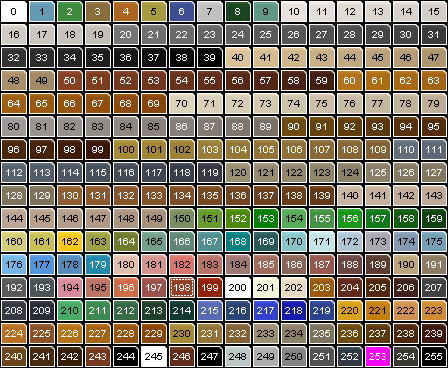
ukccatz
Download ukccatz
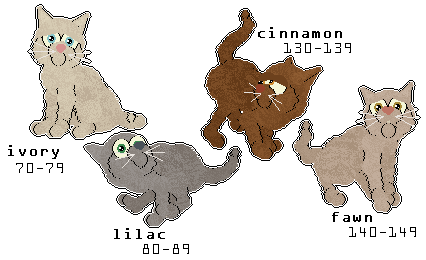
A palette that contains all of the default 'natural' texturable petz colours, with the unnatural texturable petz colours changed to colours that are commonly seen in catz. A large variety of eye and nose colours have been added.
Unchanged texturable ranges: 10-19, 20-29, 30-39, 40-49, 50-59, 60-69, 90-99, 100-109, 110-119, 120-129
Changed texturable ranges: 70-79, 80-89, 130-139, 140-149
New colour details:
| Index Range | Colour Name (solid/self) | Accepted Uses |
|---|---|---|
| 70-79 | Ivory |
Accepted for every usage where
is listed
|
| 80-89 | Lilac |
Accepted as in the following colours & patterns:
Solid Lilac (incl. hairless) Lilac Tortoiseshell Lilac regular, silver & golden tabby/torbie Lilac solid, tortie, tabby & torbie colourpoint/mink/burmese Lilac smoke Lilac silver & golden shaded/chinchilla Lilac regular, silver, snow & silver snow leopard Body & fur point colour in lilac hairless catz (all varieties) Accepted for every usage where is listed in dogz
|
| 130-139 | Cinnamon |
Accepted as in the following colours & patterns:
Solid Cinnamon (incl. hairless) Cinnamon Tortoiseshell Cinnamon regular, silver & golden tabby/torbie Cinnamon solid, tortie, tabby & torbie colourpoint/mink/burmese Cinnamon smoke Cinnamon silver & golden shaded/chinchilla Cinnamon regular, silver, snow & silver snow leopard Body colour in solid cinnamon hairless catz (all varieties) Fur point colour in solid cinnamon hairless catz (brush & velour) Accepted for every usage where is listed in dogz
|
| 140-149 | Fawn |
Accepted as in the following colours & patterns:
Solid Fawn (incl. hairless) Fawn Tortoiseshell Fawn regular, silver & golden tabby/torbie Fawn solid, tortie, tabby & torbie colourpoint/mink/burmese Fawn smoke Fawn silver & golden shaded/chinchilla Fawn regular, silver, snow & silver snow leopard Fur point colour in solid fawn hairless catz (all varieties) Body colour in solid fawn hairless catz (brush & velour) Accepted as in the following colours & patterns:
Fawn solid burmese |
Additional Notes:
70s range has been changed - you may want to change the tongue and pawpad colours in petz that use this palette.
Tested & Accepted hairless/skin textures:


ukccatzdense
download ukccatzdense
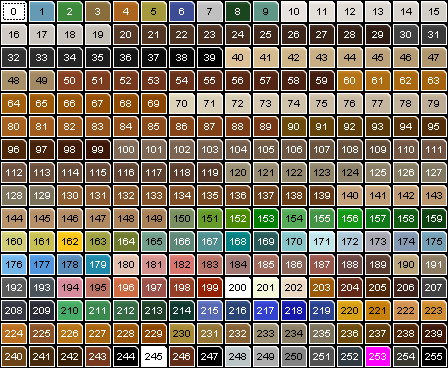
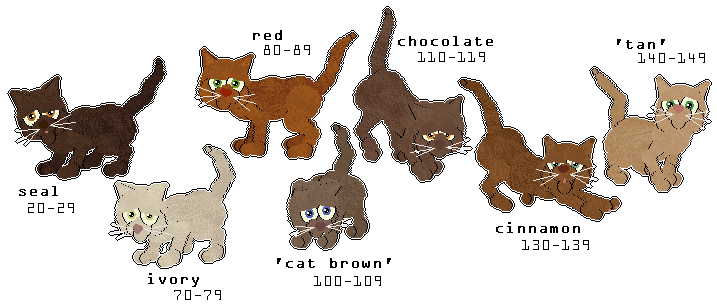
A palette that contains all of the default dense cat colours, plus other colours that are commonly combined with these dense colours for various cat patterns. A large variety of eye and nose colours have been added.
Unchanged texturable ranges: 10-19, 30-39, 40-49, 50-59, 60-69, 90-99, 120-129
Changed texturable ranges: 20-29, 70-79, 80-89, 100-109, 110-119, 130-139, 140-149
New colour details:
| Index Range | Colour Name (solid/self) | Accepted Uses |
| 20-29 | Seal/Chocolate | Accepted for every usage where is listed
Also accepted for every usage where is listed
|
| 70-79 | Ivory | Accepted for every usage where is listed |
| 80-89 | Red | Accepted for every usage where is listed |
| 100-109 | 'Cat brown' | Accepted for every usage where is listed |
| 110-119 | Chocolate | Accepted for every usage where is listed |
| 130-139 | Cinnamon | Accepted as in the following colours & patterns:
Solid Cinnamon (incl. hairless) Cinnamon Tortoiseshell Cinnamon regular, silver & golden tabby/torbie Cinnamon solid, tortie, tabby & torbie colourpoint/mink/burmese Cinnamon smoke Cinnamon silver & golden shaded/chinchilla Cinnamon regular, silver, snow & silver snow leopard Body colour in solid cinnamon hairless catz (all varieties) Fur point colour in solid cinnamon hairless catz (brush & velour) Accepted for every usage where is listed in dogz
|
| 140-149 | 'Tan' | Accepted as in the following colours & patterns:
Light markings in black, chocolate, cinnamon & red tabbies Base colour in cinnamon tabbies Striping colour in cream tabbies Base colour in black, chocolate & cinnamon golden tabbies Body colour in black, chocolate & cinnamon points (relaxed) Point colour in cinnamon points Body colour in chocolate & cinnamon minks/burmese Body colour in red burmese Point colour in cream minks Dilute red tabby in torbie burmese Tipping colour in red & cream silver & golden shaded/chinchilla Base colour in black & chocolate golden shaded/chinchilla Body colour in black amber Striping colour in blue amber Light markings in leopard tabbies Base colour in chocolate & cinnamon leopard Cluster colour in black & chocolate snow leopard Body colour in solid hairless catz (chocolate & red (fully hairless); red, chocolate & cinnamon (brush & velour)) Accepted for every usage where is listed in dogz
|
Additional Notes:
70s range has been changed - you may want to change the tongue and pawpad colours in petz that use this palette.
20s range has been changed - if used on dogz that have a nose with the 'Draw as Nose' outline (i.e default PFM dog nose), paintball noseshines will have to be used instead.
Tested & Accepted hairless/skin textures:
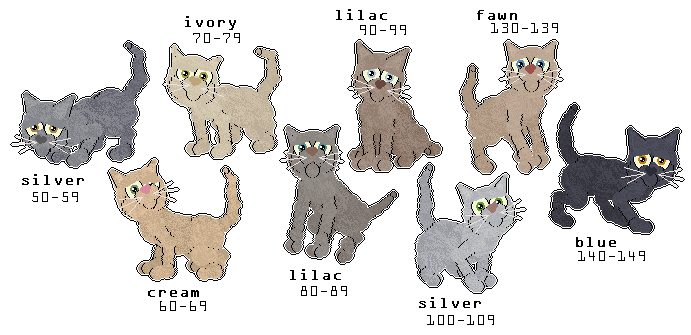
ukccatzdilute
download ukccatzdilute
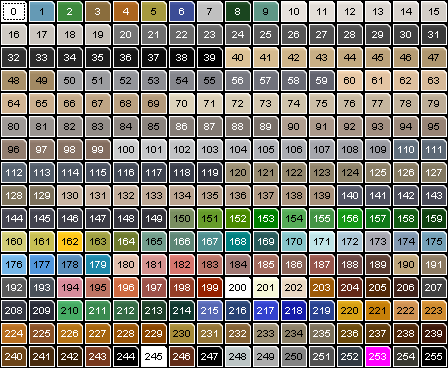
A palette that contains all of the default dilute cat colours, plus other colours that are commonly combined with these dilute colours for various cat patterns. A large variety of eye and nose colours have been added.
Unchanged texturable ranges: 10-19, 20-29, 30-39, 40-49, 110-119, 120-129
Changed texturable ranges: 50-59, 60-69, 70-79, 80-89, 90-99, 100-109, 130-139, 140-149
New colour details:
| Index Range | Colour Name (solid/self) | Accepted Uses |
| 50-59 | Silver | Accepted for every usage where is listed |
| 60-69 | Cream | Accepted for every usage where is listed |
| 70-79 | Ivory | Accepted for every usage where is listed |
| 80-89 | Lilac | Accepted as in the following colours & patterns:
Solid Lilac (incl. hairless) Lilac Tortoiseshell Lilac regular, silver & golden tabby/torbie Lilac solid, tortie, tabby & torbie colourpoint/mink/burmese Lilac smoke Lilac silver & golden shaded/chinchilla Lilac regular, silver, snow & silver snow leopard Body & fur point colour in lilac hairless catz (all varieties) Accepted for every usage where is listed in dogz
|
| 90-99 | Lilac | Accepted as in the following colours & patterns:
Solid Lilac (incl. hairless) Lilac Tortoiseshell Lilac regular, silver & golden tabby/torbie Lilac solid, tortie, tabby & torbie colourpoint/mink/burmese Lilac smoke Lilac silver & golden shaded/chinchilla Lilac regular, silver, snow & silver snow leopard Body & fur point colour in lilac hairless catz (all varieties) Accepted as in dogz in the following colours & patterns:Every usage where is used for isabellaRed & isabella merle Brindle base colour for isabella brindles Isabella sable Red silver, liver silver, isabella grizzle |
| 100-109 | Silver | Accepted for every usage where is listed |
| 130-139 | Fawn | Accepted as in the following colours & patterns:
Solid Fawn (incl. hairless) Fawn Tortoiseshell Fawn regular, silver & golden tabby/torbie Fawn solid, tortie, tabby & torbie colourpoint/mink/burmese Fawn smoke Fawn silver & golden shaded/chinchilla Fawn regular, silver, snow & silver snow leopard Fur point colour in solid fawn hairless catz (all varieties) Body colour in solid fawn hairless catz (brush & velour) Accepted as in the following colours & patterns:
Fawn solid burmese |
| 140-149 | Blue | Accepted for every usage where is listed |
Additional Notes:
70s range has been changed - you may want to change the tongue and pawpad colours in petz that use this palette.
Tested & Accepted hairless/skin textures:

Dogz Palettes
Palettes that are designed primarily with dogz in mind, but may also be used for catz.
Note: Take caution when using any of these palettes (and any palettes in general) that have an edited 20-29 index range. Some dogz files use the 'draw outline as nose' outline setting for the nose, which draws grey colours from the 20-29 index range. If using a palette with an edited 20-29 index range, and the dog file uses this outline setting for the nose, then the outline setting will need to be changed to -1 ('no outline') for the nose balls and paintball noseshine(s) will have to be added.
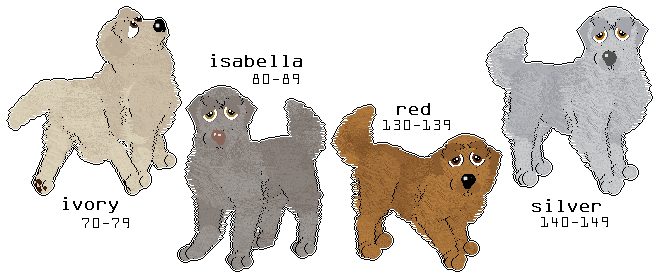
ukcdogz
Download ukcdogz
A palette that contains all of the default 'natural' texturable petz colours, with the unnatural texturable petz colours changed to colours that are commonly seen in dogz. A large variety of eye and nose colours have been added.
Unchanged texturable ranges: 10-19, 20-29, 30-39, 40-49, 50-59, 60-69, 90-99, 100-109, 110-119, 120-129
Changed texturable ranges: 70-79, 80-89, 130-139, 140-149
New colour details:
| Index Range | Colour Name (solid/self) | Accepted Uses |
|---|---|---|
| 70-79 | Ivory |
Accepted for every usage where
is listed
|
| 80-89 | Isabella |
Accepted for every usage where is listed in dogz
Accepted as in the following colours & patterns:
Solid Lilac (incl. hairless) Lilac Tortoiseshell Lilac regular, silver & golden tabby/torbie Lilac solid, tortie, tabby & torbie colourpoint/mink/burmese Lilac smoke Lilac silver & golden shaded/chinchilla Lilac regular, silver, snow & silver snow leopard Body & fur point colour in lilac hairless catz (all varieties) |
| 130-139 | Red |
Accepted for every usage where is listed in dogz
|
| 140-149 | Silver |
is listed
|
Additional Notes: Additional Notes:
70s range has been changed - you may want to change the tongue and pawpad colours in petz that use this palette.
ukcdogzmerlebs
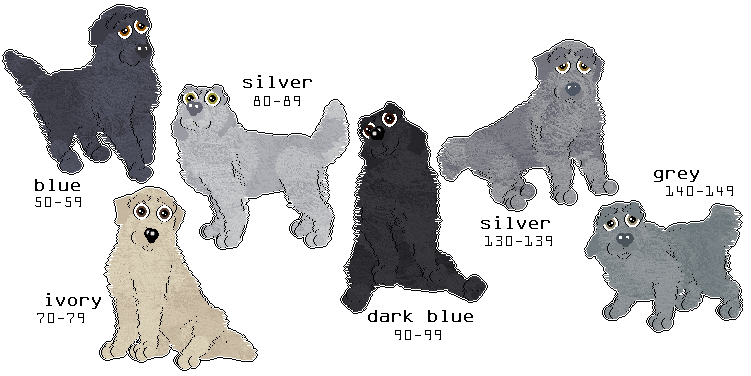
Download ukcdogzmerlebs
A palette that contains a range of black and blue colours that are useful for hexing blue (black) and slate (blue) merles. Tan colours have been retained as merle is often combined with the tan point pattern. A large variety of eye and nose colours have been added.
Unchanged texturable ranges: 10-19, 20-29, 30-39, 40-49, 60-69, 100-109, 110-119, 120-129
Changed texturable ranges: 50-59, 70-79, 80-89, 90-99, 130-139, 140-149
New colour details:
| Index Range | Colour Name (solid/self) | Accepted Uses |
|---|---|---|
| 50-59 | Blue |
Accepted for every usage where
is listed
|
| 70-79 | Ivory |
Accepted for every usage where
is listed
|
| 80-89 | Silver |
Accepted for every usage where
is listed
|
| 90-99 | Dark Blue |
Accepted for every usage where
is listed
|
| 130-139 | Silver |
Accepted for every usage where
is listed
|
| 140-149 | Grey |
Accepted for every usage where
is listed
|
Additional Notes:
70s range has been changed - you may want to change the tongue and pawpad colours in petz that use this palette.
ukcdogzmerleri
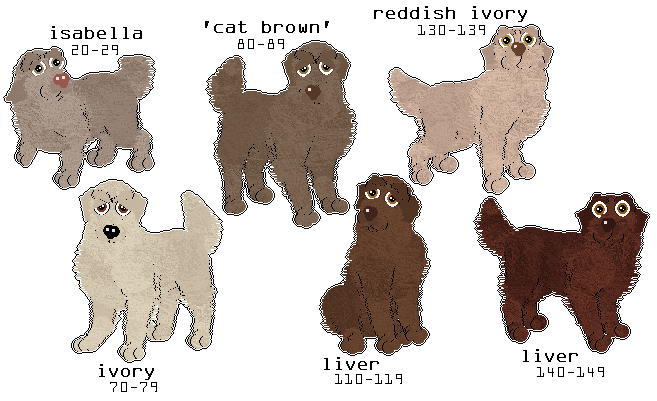
Download ukcdogzmerleri
A palette that contains a range colours that are useful for hexing red (liver) and isabella merles. Tan colours have been retained as merle is often combined with the tan point pattern. A large variety of eye and nose colours have been added.
Unchanged texturable ranges: 10-19, 30-39, 40-49, 50-59, 60-69, 90-99, 100-109, 120-129
Changed texturable ranges: 20-29, 70-79, 80-89, 110-119, 130-139, 140-149
New colour details:
| Index Range | Colour Name (solid/self) | Accepted Uses |
|---|---|---|
| 20-29 | Isabella |
Accepted as in dogz in the following colours & patterns: Every usage where is used for isabellaRed & isabella merle Brindle base colour for isabella brindles Isabella sable Red silver, liver silver, isabella grizzle Accepted as in the following colours & patterns:
Solid Lilac (incl. hairless) Lilac Tortoiseshell Lilac regular, silver & golden tabby/torbie Lilac solid, tortie, tabby & torbie colourpoint/mink/burmese Lilac smoke Lilac silver & golden shaded/chinchilla Lilac regular, silver, snow & silver snow leopard Body & fur point colour in lilac hairless catz (all varieties) |
| 70-79 | Ivory |
Accepted for every usage where
is listed
|
| 80-89 | 'Cat brown' |
Accepted for every usage where
is listed
|
| 110-119 | Liver |
Accepted for every usage where
is listed
|
| 130-139 | Reddish ivory |
Accepted as
in dogz in the following colours & patterns: Red & isabella merle |
| 140-149 | Red |
Accepted for every usage where
is listed in dogz
|
Additional Notes:
70s range has been changed - you may want to change the tongue and pawpad colours in petz that use this palette.
20s range has been changed - if used on dogz that have a nose with the 'Draw as Nose' outline (i.e default PFM dog nose), paintball noseshines will have to be used instead.
ukcdogzsablerl
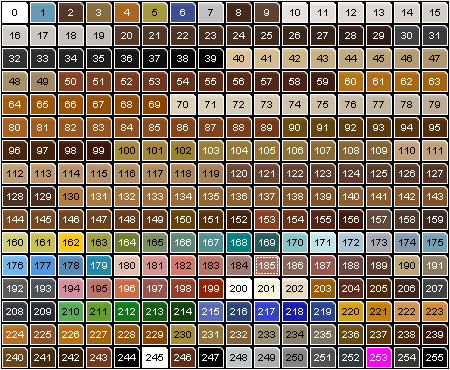
Download ukcdogzsablerl
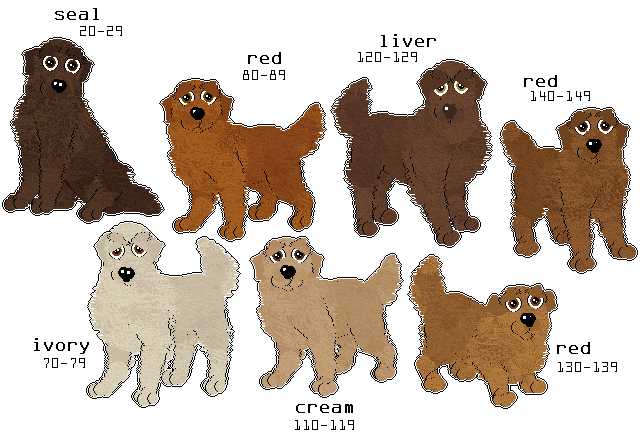
A palette that contains a range of red and liver colours, useful for hexing red and liver sables, red and liver grizzles, and black, deer, and liver dominos. Also useful for hexing black and liver brindles, solid red dogz, and solid black and liver dogz with tan points. A large variety of eye and nose colours have been added.
Unchanged texturable ranges: 10-19, 30-39, 40-49, 50-59, 60-69, 90-99, 100-109
Changed texturable ranges: 20-29, 70-79, 80-89, 110-119, 120-129, 130-139, 140-149
New colour details:
| Index Range | Colour Name (solid/self) | Accepted Uses |
|---|---|---|
| 20-29 | Seal/Liver |
Accepted for every usage where
is listed
Also accepted for every usage where is listed
|
| 70-79 | Ivory |
Accepted for every usage where
is listed
|
| 80-89 | Red |
Accepted for every usage where
is listed
|
| 110-119 | Cream |
Accepted for every usage where
is listed in dogz
Accepted as in catz in the following colours & patterns:
Light markings in black, chocolate, cinnamon & red tabbies Base colour in cinnamon tabbies Striping colour in cream tabbies Base colour in black, chocolate & cinnamon golden tabbies Body colour in black, chocolate & cinnamon points (relaxed) Point colour in cinnamon points Body colour in chocolate & cinnamon minks/burmese Body colour in red burmese Point colour in cream minks Dilute red tabby in torbie burmese Tipping colour in red & cream silver & golden shaded/chinchilla Base colour in black & chocolate golden shaded/chinchilla Body colour in black amber Striping colour in blue amber Light markings in leopard tabbies Base colour in chocolate & cinnamon leopard Cluster colour in black & chocolate snow leopard Body colour in solid hairless catz (chocolate & red (fully hairless); red, chocolate & cinnamon (brush & velour)) |
| 120-129 | Liver |
Accepted for every usage where
is listed
|
| 130-139 | Red |
Accepted for every usage where
is listed in dogz
|
| 140-149 | Red |
Accepted for every usage where
is listed in dogz
Accepted as in catz in the following colours & patterns: Solid Cinnamon (incl. hairless) Cinnamon Tortoiseshell Cinnamon regular, silver & golden tabby/torbie Cinnamon solid, tortie, tabby & torbie colourpoint/mink/burmese Cinnamon smoke Cinnamon silver & golden shaded/chinchilla Cinnamon regular, silver, snow & silver snow leopard Body colour in solid cinnamon hairless catz (all varieties) Fur point colour in solid cinnamon hairless catz (brush & velour) |
Additional Notes:
70s range has been changed - you may want to change the tongue and pawpad colours in petz that use this palette.
20s range has been changed - if used on dogz that have a nose with the 'Draw as Nose' outline (i.e default PFM dog nose), paintball noseshines will have to be used instead.