General Hexing Guidelines
This document intends to serve as a basic guideline on how to read the breed standards and docs at UKC in order to hex A-registerable petz. A basic knowledge of hexing is assumed throughout this guide - it is not a guide on how to hex in general as there are plenty of resources around the Petz Community for that!
Please keep in mind that UKC standards may differ from the standards of other showing clubs. If showing in clubs with similar rules, please check both standards. A-reg status in another club does not mean you are guaranteed it at UKC and vice versa.
UKC allows the editing of .pet files, as well as breedfiles, as long as the pet is not yet pointed in conformation. If your pet 'Example' has been registered and has received conformation points but is then flagged in a show due to not being A-reg, you cannot just fix Example and continue showing him under the same registration. If you want to fix and carry on showing Example, you will have to fix him and then register him again. However, if Example is DQ'ed and has not already received conformation points, then you can edit him and resubmit him for acceptance using the same registration, at the bottom of the pet profile page.
Editing petz when they are already registered to keep their conformation points after they have been disqualified from conformation due to not meeting standards, or you've discovered their apperance is faulted or less preferred, is considered cheating and is strictly not allowed. This is why it's important to read the standard, including what is faulted, before registering a pet!
Faulted petz are still A-reg. A steward will not inform you if your pet is faulted, so please make sure to check carefully before registering if this matters to you. Examples of easy to miss faults include the wrong eye colour, wrong nose colour, etc.
Accepting A-reg petz is a manual process. It may take time to get to your pet, and inevitable that stewards will make a mistake at some point. Please be patient!
Using the standards and docs
When setting out to hex an A-registerable pet, you will probably start on the breed standard page for the breed you have chosen. These pages detail what patterns are allowed in what colours, what the accepted eye and nose colours are, what is faulted and disqualified, and then lists the UKC accepted files for that breed. Note that by default, many of the breedfiles include multiple variations straight from the Adoption Center, however not all of these may be A-reg. Even if you're not hexing and are just adopting a pet from the Adoption Center, it is still important to check the breed standards to see if the pet you have adopted is A-registerable.
Clicking on the names of each pattern in the breed standards will lead you to pages that break down these patterns in full detail. These are the docs, or standard definitions, and they provide a comprehensive breakdown into each of the coat patterns that catz and dogz may exhibit, including acceptable colour combinations, any specific textures that need to be used, and how these patterns interact and look with each other. Most of the docs also contain a table of visual examples of petz in those patterns - these are not exhaustive, and only show a handful of possible combinations that you could hex for each pattern!
UKC has graciously taken these breed standards and standard definitions from PKC and has made some modifications and clarifications, plus updates for recent petz technologies such as palettes. Nothing has been taken away from these standards and definitions from their original home on PKC, and credit goes to PKC for these original pages that we have built upon. Everything in the PKC standards has been left as it is for legacy reasons, however some combinations aren't realistic to real life examples of colours. For example,  is often used to depict fawn in catz, however this colour is not really close to what fawn looks like in real life. These were done due to past hexing limitations. You're welcome to use these combinations still, but you may also use modern hexing techniques, such as palettes, to achieve more realistic results.
If anyone feels like a breed standard is missing something that they believe should be A-registerable, feel free to pitch a case to the UKC Stewards to add it to the breed standard. We welcome expansion, however your suggestion may not necessarily be added, especially if there is limited evidence of real life animals of the breed displaying what you are wanting added. We recommend providing picture examples, particularly those of show champions, that show the colours or pattern that you want adding to the standards. More information can be found on the Petz Life forum's Conformation Update Requests board.
Colour Swatches
Both the breed standards and standard definitions make heavy use of little colour swatches - you've probably already seen them about! These swatches are a concise way of indicating what petz colours can be used in breeds and patterns. A swatch represents every shade in that index range - for example, if a breed standard lists solid  as being accepted, then any solid colour in the index range 100-109 is accepted. Some swatches represent external textures, as these colours cannot be 'made' using the original petz texturable range of colours (10-149) without using palettes. When hovering over a swatch on a breed standard, it will list the index range of that colour in the default petz palette.
Below is a table that shows each swatch side-by-side with a gradient of its texturable range and its index numbers in the default petz palette. Names for each colour (e.g lilac, chocolate) have not been listed, as the colours represented by the swatches are called different names in catz and dogz, and can vary between patterns - the palettes doc has a table that lists the colour names in solid/self petz. Some accepted textures for the swatches that represent external textures can be found in the textures doc, except for the hairless textures which can be found in the hairless docs. A comprehensive list of accepted textures can be found in the Texture Library.
| Swatch | Gradient | Default Petz Indexes |
|---|---|---|
 |
 |
10 – 19 |
 |
 |
20 – 29 |
 |
 |
30 – 39 |
 |
 |
40 – 49 |
 |
 |
50 – 59 |
 |
 |
60 – 69 |
 |
 |
90 – 99 |
|
 |
100 – 109 |
 |
 |
110 – 119 |
|
 |
120 – 129 |
 |
N/A | 'Ivory' – External Texture |
 |
N/A | 'Silver' – External Texture |
 |
N/A | 'Lilac' – External Texture |
 |
N/A | 'Cinnamon' – External Texture |
 |
N/A | 'Cat Brown' – External Texture |
 |
N/A | 'Seal' – External Texture |
 |
N/A | 'Dark Blue' – External Texture |
 |
N/A | Hair20 @ 0 transparency (opaque); used only as a base colour in grizzles |
 |
N/A | Hairless external texture (fully hairless only) |
 |
N/A | Hairless external texture (all hairless coat varieties) |
Palettes
Prism's modified Petza fork now means that any colour can be used in the petz game (we're no longer limited to the original 256!) with the use of palettes. The palettes doc discusses palettes and how to use them in detail, as well as provides a few 'easy-start' palettes for A-reg hexing.
UKC allows the use of any palettes, however it is up to the stewards' discretion as to whether the colours you have used look realistic. In addition, judges also have the right to consider the shade/hue of paletted colours less realistic and/or desirable than other shades/hues for a breed.
There are certain colours that must not be changed for a pet to be A-registerable - the 10-19 range for white fur, 244/jet black for outlines, and 245/201 for eye whites. Before hexing any pet for A-registration with a palette, it is recommended to read the palette document in full. Furthermore, before doing any extensive hexing with a palette not provided on the UKC palettes page, it is recommended to check if the colours you intend to use are okay beforehand by contacting a steward.
Textures
Using textures is fully broken down in the textures doc, with some docs going into more detail about the textures used to represent those patterns (for example, the tabby doc). Using textures with palettes is fully broken down in the palettes doc. Textures for petz should always be in .bmp format, otherwise they will not work. Additional important points are detailed below.
Importing Textures
External textures must be imported - that is, read from your game directories - via LNZ Pro. The easiest way to do this is to load the textures you want to use on your hex in via LNZ Pro before loading the file up and hexing in Petz Workshop. When a texture is imported in via Petz Workshop, Petz Workshop creates an internal path for the texture within the breedfile - it effectively 'internalises' it - however it often does not do this well and the textures often look sparkly or gritty, not as they should.
In the breedfile or petfile in LNZ Pro, the pathing for external textures should always be one from your game directories, and not from the game's internal resources. For example, if I save a texture called 'example' in a folder named 'Textures' in the 'Resource' folder of my petz game, then it should show up in the Texture List in LNZ Pro as '/resource/textures/example.bmp'. This is correct. If I import an external texture in via Petz Workshop, it will create a pathing from the game's internal resources - for example in a cat breedfile, 'ptzfiles/cat/Ca/texturename.bmp' - this is not correct. However, you can still import textures in via PWS if you go into the LNZ after and reroute the texture to where it is saved in your game directories.
Note that it is only necessary to import your textures via LNZPro - you can still go into Petz Workshop and apply the texture to balls and hex with it as normal. This also does not apply to internal game textures (i.e the ones that come with the game and are found in the game resources by default) - unless you save and import them as external files, they will always show up with a root in the internal 'ptzfiles' - this is normal and accepted for use.
Petz Fur Textures
The Petz game comes with multiple internal textures which are widely used to depict fur in petz - for example, hair10, hair3, etc. Apart from detail features (such as eyeballs, noses, pawpads, tongues, etc.) and some very specific circumstances (that are outlined in the texture doc), all areas of an A-registerable pet must have texture.
UKC allows for people to swap between different fur textures - we don't require people to just use the fur texture that the breedfile was accepted with. However, the fur texture used must accurately represent the coat type of the pet. The wiry looking hair3, for example, cannot be used on a shorthaired pet. Below is a table that categorises all of the base game internal fur textures (used as fully transparent textures, at 1 transparency) into the coat types they can be used for.
| Shorthair | Longhair | Wirehair/Rex | Hairless/clipped | Accents only |
|---|---|---|---|---|
|
|
|
|
|
There are certain breedfiles that require specific fur textures - for example, the Komondor and its corded coat - external textures must be used to achieve the look of this coat type and can be found at the Texture Library. A breed may use any textures it was accepted with, and any other breedfile for the breed may use them too.
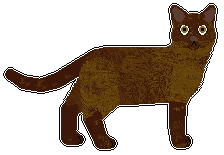
'Plush' is the most frequently used accent texture and is often found on feathering and ears. It can also be used on catz in pointed patterns to create a contrast between the points and body where otherwise there might not be any; for example the cat below is a chocolate burmese with body and points - transparent plush is used on the points to differentiate these from the body colour. Other textures that create a richer, darker effect (for example, mottled5) or darken textures (found at the texture library) can also be used on points as long as the fur type matches the fur type of the breed, and the rest of the cat.
Detail Features & SCPs
Detail features include eyeballs, pawpads, tongues, whiskers, and more - basically anything that is not part of the fur pattern on a pet. The doc that discusses these can be found here. Accepted eye colours are always specified in the breed standards, but additional information on these can be found within the eye colour doc. Accepted nose colours are always specified in the breed standards of dogz - information on cat nose colours is a little different though, and can be found within the cat nose colours doc.
SCP determines the 'base' personality of a pet. Each default PFM breed has a different SCP, which makes the breeds behave in different ways. For showing, this means that some breeds do not pose normally or naturally - for example, the poodle, siamese. and orange shorthair. As a result, community hexed breedfiles often use a different SCP - for instance, the SN Siamese uses the B&W Shorthair SCP, as the B&W Shorthair SCP means that these catz pose normally for the camera but still keep their angry eyelids.
UKC follows PKC in that we allow people to freely swap the SCPs of breedfiles, as long as a file with that particular SCP has been accepted for that breed. Using the Siamese example again, because the SN Siamese has been accepted with a B&W Shorthair SCP, you can swap the SCP of the PFM Siamese to the B&W Shorthair SCP.
Z Shade Slope
If a hex looks wrong due to the shading applied to the balls, you may use Z Shade Slope to flattern the shading.
[Z Shade Slope]
-110
Values other than -110 are also allowed. You may find that another value is needed to make it look right, or the technique does not help at all. It all depends on the colours and textures used.
Pattern Interactions
A pet is not always one pattern - for example, solid black with no other markings. They may show white markings/spotting, or tan points (dogz), or be in the colourpoint pattern (catz). Although, genetically, how patterns interact is much more complex, it helps when hexing A-registerable petz to visualise patterns interacting in 'layers'.
Below are tables for catz and dogz that show how the various patterns layer - that is, what patterns show on top of the others. Patterns layer from left to right across each table, with each layer being visible 'on top of' the patterns to the left. Keep in mind that not every pet has to display a pattern from every layer, this is just a visual to help if you say, for example, want to hex a dog with tan points, masking, and white spotting, and are wanting to know what shows on top of what. Some patterns are modifiers (for example, colourpoint/mink/burmese) which rather than layer 'above' the base pattern, they modify how it appears. Some pattern only modify parts of the base colour below them - for example, urajiro only modifies and appears on red areas of a dog. A pet will never display two (or more) patterns that share the same column. See each pattern's doc for more information
Dogz
| Base Pattern | Layer 1 | Layer 2 | Layer 3 | Layer 4 | Layer 5 | Layer 6 |
|---|---|---|---|---|---|---|
|
Tan Points | Urajiro (modifies only red areas underneath) | Masking | White Markings | Ticking/roan (modifies only white markings) | Pigment Spotting (modifies only white markings) |
Catz
| Base Pattern | Layer 1 (point pattern modifiers) |
Layer 2 |
|---|---|---|
|
|
White Spotting |
If attempting maximum realism, there are also some patterns that cannot appear together. In dogz, domino, recessive red, and masked are all caused by the same gene and thus cannot be combined. Similarly, tan points, grizzle, and sable cannot be combined either. However, if a standard still allows these patterns to combine, they will not be faulted. UKC does not expect its members to be genetic experts who are aware of these intricacies.
Cropping Ears and Docking Tails
Traditionally, a number of dog breeds have been cropped and/or docked. Though the ethics of this are widely discussed and contested in real life, UKC is only concerned with fake, pixel petz and holds an unbiased approach to cropping and docking; all looks compete on even terms with no preference in either direction.
Files can only be shown with the body shape they were accepted with. You can't remove tail balls to "dock" a file, or add an ear variation with cropped ears, without the hexer's permission. Any changes that are made to a file that have been made with the hexer's permission, even if it is just adding docked tail or cropped ear variations, require the file to be resubmitted for acceptance before petz from them can be A-registered at UKC.
Body Parts
Throughout the standards and docs, body parts (e.g. chest, belly, neck, legs) are used to describe where markings should be placed and how patterns should flow. Sometimes, the body areas that these terms describe may vary between different docs and patterns, due to how different patterns work differently in real life. When terms have specific meanings, and markings have specific placements, those meanings and placements will be detailed in the relevant standard definition docs.
One term that comes up in both catz and dogz standard definition docs is lower legs. Unless stated otherwise, lower legs means up to and including the ankle, and up to and including the wrist, in both catz and dogz.
Another term that is used a lot in both catz and dogz standard definition docs is belly, which unless stated otherwise, means the whole belly ball, not just the underbelly. When describing just the lower part of an animal's belly, the term underbelly is used.
Hexer's Rights and Modifying Breed Files
To compete in conformation at UKC, all breed files must first be officially accepted. Once accepted, anyone can hex-paint the breed file without the hexer's permission, but they may NOT alter the shape in any way. This includes but is not limited to cropping ears, docking tails, creating natural ears or tails or changing their shapes, etc. If a file's shape is changed in any way, any petz from that file are not registerable and the file must be submitted for acceptance again.
In addition, UKC will not accept any file that had its shape changed without the original hexer's permission. An exception to this rule can be made if the hexer has been out of the community for a long time and the change is a fix to the file. If you use a file as a base breed without the original hexer's permission, no matter how long they've been gone, we will not accept the breed. Also, if you copy sections of LNZ information (i.e. copy a Addballz tail, copy a Paintballz spot pattern) from an existing file without the original hexer's permission, the file will not be accepted. You may use existing files to learn, but copying segments is not acceptable.
It is recommended you request the permission of the furfile creator before including someone else's furfile in your breed. If unsure, don't include it. People can add it themselves later on without breaching your hexer's rights or the rights of the furfile creator.
Some people have given permission for their files to be freely used for new breedfiles without needing to ask first. These people are:
Jess of Abnormality. Please note that Abnormality consisted of two hexers (Jess and Vicki), so if you use one of the breeds as a base to hex a new breed, be absolutely certain that it is one of Jess's files first.
Semicolon
If you wish to add your name to this list, please contact either Harry or Hoodie. Permission can be given in general, or only for specific files (e.g. only textures, or only one breedfile).
Getting Help
Hexing petz for A-registration for the first few times can be very overwhelming. The breed standards and standard definitions aim to help with this as much as possible, and we recommend throughly reading the documents that cover all the patterns of the pet you want to hex before you start hexing them. However, UKC Stewards and happy to answer any questions you may have about conformation, be that how the showing format works or clarifications on any of the standards or documents provided on the UKC website. This includes, but is not limited to, questions about specific colours and patterns, questions about breedfiles, textures and palettes, questions about what particular wording means, or simply an 'is this pet A-reg?' question.
Questions pertaining A-reg petz and conformation showing may be asked in the 'reg-questions' channel in the Petz Life Discord server or the Conformation Help Board on the Petz Life forum, where a steward will see it and answer. Alternatively, if you are not on either platform or do not want to ask a question publically for any reason, you may DM Hoodie or KingHarry.
Useful Resources
There are many good resources to be found online that show dogs and cats patterns and how they work and interact genetically. Some of these are listed below, for you to use and reference if you so wish:
The Messybeast Website - an exhaustive guide and reference for cat patterns and genetics
Plain English Guide to Cat Colours & Patterns - found at Messybeast
Cat Colour and Pattern Charts - found at Messybeast
The Little Carnivore - another basic cat colours guide; further articles on cat coats & colours are also linked at the bottom
Harry's Cat Colour Pinterest Board - lots of visual examples, categorised by coat colour and patterns
The Doggenetics Website - an exhaustive guide and reference for dog patterns and genetics. Fun fact: this website is made and owned by Jess@Abnormality, who was part of the Petz Community and made many breedfiles that are still used today!
Labgenvet - a good basic guide to dog genetics
Coats and Colours - another resource for dog patterns and genetics
Cat Kitten Calculators - calculates possible coats and colours of kittens based on their genetics
Dog Puppy Calculator - calculates possible coats and colours of puppies based on their genetics
If you know of any other useful resources that you feel should be linked, please let us know; we would be happy to add them!