Textures
If you're familar with hexing, you're likely familiar with textures. All petz that you wish to be A-registered at UKC must be textured, outside of some very specific circumstances that are outlined at the bottom of this doc. Some patterns require you to use external textures (e.g. smoke), whilst some patterns you'll likely want to use them (e.g. tabby). Important information regarding the importing of external textures and general fur textures is given in the general hexing guidelines doc - please read this carefully!
In this doc you will find more specific information on how to use the Texture Library, what the different types of textures are and how to use them, and the exception cases for textureless areas of a pet.
The Texture Library

UKC has adopted PKC's way of organising and listing textures - by having a Texture Library. At UKC's texture library, you'll find all of the previously accepted PKC textures, listed alongside their names, transparency values, and their usage cases. These textures can be saved straight off the pages into your petz folders, ready for you to use.
The Texture Library is organised in to categories of what textures depict each pattern - for example, textures made for use to depict a tortoiseshell pattern can be found on the tortie page within the Texture Library. It is important to still read and refer to the standard definition page for whatever pattern you're hexing in order to use and place any textures correctly. Certain standard definition docs feature specific info on what textures are accepted - for example, the hairless catz doc shows which hairless textures are accepted for each variety of hairless cat. Just because a texture is listed in the Texture Library does not mean that is acceptable for use in every pet in the pattern that it is made to depict - be sure to check the usage notes of the texture you want to use in the Texture Library, and always refer back to the relevant standard definitions documents for the pattern you are aiming to hex.
UKC differs from PKC in that we do not have an acceptance process for textures. All we require is that any textures used realistically depict the patterns they depict. You may still see the term 'PKC-accepted texture' used in this document and potentially elsewhere - this is used in reference to textures that were previously accepted by PKC.
The Texture Library is not a fully exhaustive resource of every realistic pet texture out there. If you want to use a texture that isn't listed in there, we recommend contacting the stewards beforehand to make sure that the texture(s) you want to use is realistic. We encourage people to make new textures if they so wish! If you have made a texture or texture set that you would like to use and be available publically on the Texture Library, please contact the stewards with all the relevant information. This information for textures would be: what pattern and colour the texture(s) represent(s), what # each texture is transparent at, and picture examples of the texture(s) in game. It is up to the stewards' discretion as to whether a texture, made by yourself or someone else, is realistic okay for usage on an A-reg pet.
Textures and Palettes
Using textures with external palettes is not as straightforward as using textures with the default petz palette. All of the information you will need on hexing with textures and external palettes can be found in the Palettes doc. Even textures that are fully-transparent may not work as you expect when using an external palette, so it is important to check the information on the palettes doc before committing to a hex.
Transparent, Semi-transparent, and Opaque textures
In the Texture Library, you will come across three different types of textures - ones intended for use as fully-transparent textures, ones intended for use as semi-transparent textures, and ones intended for us as opaque textures. Fully transparent textures will always be used at transparency 1, opaque textures will always be used at transparency 0, and semi-transparent textures will vary depending on what index range in the texture is designed to be transparent. Further details on each texture type can be found below:
Transparent Textures

Textures made to be used as fully transparent textures (transparency set to 1 in the Texture List in the LNZ) will often look like the texture above, where the texture has been made using colours from a singular index range (the example above uses 130-139). When applied to a pet, these will display their pattern in whatever colour is used on the pet underneath it. If I use the above texture at transparency 1 on a ball that is coloured index 60, then the ball will take on the pattern of the texture in the colour of the index range 60-69.
Only colours/indexes in the range of 10-149 are texturable. Some transparent textures may also be fully transparent at the index/colour they are designed in as well as at 1. Check the usage notes in the Texture Library for information on what transparency number(s) can be used for different textures. The default PF.Magic pet/hair textures (hair10, cali5, plush etc.) are all also transparent at 1, even though they feature colours/indexes from many different ranges in the petz palette. These textures are often still used as the default fur textures for many accepted breedfiles.
Semi-transparent Textures

Textures made to be used as semi-transparent textures will often look like the texture above, where one index range is intended to display in game as it is in the texture, and one index range is intended to be transparent and display as whatever colour/index is on the ball that it is placed on. The transparency number will be the index number of the colour that is to be replaced, in reference to the default petz palette - for example, the texture above is designed so that the green areas are to be transparent, this green in the petz palette is the index range of 130-139, therefore this texture should be set to be transparent for any number in the range of 130-139 in the Texture List of the LNZ. It is common practice to use the middle index of the range as the transparency number, in this case, 135, but any number in the index range will give the same result.
Opaque Textures


Opaque textures are designed to show up in game as they do in the texture image. These textures are always transparent at 0. A lot of the opaque textures in the Texture Library use index numbers from all over the default petz palette in order to depict colours that otherwise do not exist in the petz palette - for example, ivory and silver. This means they may not work very well when using palettes.
Below is a table that provides multiple textures for each external texture colour for each coat type (where possible). This is not a comprehensive list - more textures can be found in the Texture Library.
| Swatch | Colour Name | Shorthair & Longhair textures | Wirehair/Rex textures |
|---|---|---|---|
 |
Ivory |  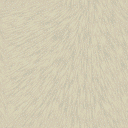  |
   |
 |
Silver |      |
   |
 |
Lilac | 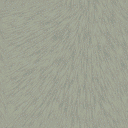  |
 |
 |
'Cat Brown' |      |
   |
 |
Cinnamon |     |
  |
 |
Seal | 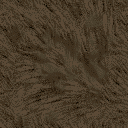  |
 |
 |
Dark Blue |  |
 |
Exceptions
As previously mentioned, all petz that you wish to be A-registered at UKC should always display texture in some capacity all over the coat. Detail features, such as eyeballs, noses, liplines, whiskers, nails, etc are considered seperate from the coat and in most cases do not have to show texture - please refer to the detail features doc for more information on these areas.
There are a couple more exceptions where petz don't have to display texture, listed below:- PF Magic Scotties - The default P.F Magic Scottish Terrier file has textureless toes and eyebrows (which use index 244). These are still A-registerable and unfaulted.
- Pigment Spotting in Dogz - Although there are textures now that depict pigment spotting for dogz, pigment spotting may still also be depicted using small, untextured, flesh, or grey coloured paintballs.